2025-14
Iteration: 2025-14
November 18, 2025
Whats New?
- Stepped Rate Plan Type →
Improvements
- Sales Importer - Added validation to prevent importing accounts with invalid Default Plans.
- Added validation to Global Price Changes to prevent users from importing large corrupted files.
- Improved quality of API’s error message for the enrollments/transaction-options endpoint.
- Removed limitation on Autorenewal Plans for Residentials Customers only.
- The term filter in Plans Manager now includes non numeric terms.
- Visual Updates for Prospects screen.
- Added trigger and custom message that can be sent to brokers when a prospect is rejected.
- When creating a new prospect package, the “Send final approved contract to Broken” is activated by default.
- UX improvement for multiselect component
Fixes / Adjustments
- UI adjustment for Renewal Notices screen that was showing incorrect information.
- Adjustment for SMT Usage graph to include Consumptions as well as Generations when retrieving usage data.
- Adjusted Background job for ECI Drops export that was not considering the specified name from System Setup.
- Added ESG Tokens and Billing Id to Enrollment Details Page.
- Fixed issue when submitting one time payment data to the ESG Billing System.
- Adjusted contract end date field in PPU UI so it reflects the correct value based on the selected plan’s term.
- Corrected issue at the time of submitting one time payments to the ESG Billing system when the amount has 4 decimal places.
- Fixed error message when renewing accounts.
- Changed how some dynamic fields are retrieved to prevent having to read from ESG datamart files and avoid having “Autoresponder Failed” errors.
- Fixed for “Autorenew this plan” checkbox that was not working as it should.
- Solved issue in Plans Manager that prevented users from sorting documents.
- Resolved error at the time of sending autoresponder after rejecting a prospect.
- Fixed API error that resulted in incorrect traunches retrieved at the moment of displaying plan data.
- Fixed dates validation at the time of getting usage data for accounts with a Pending status.
Features & Fixes Details
Steps Plan Type
There are scenarios where a Retail company offers plans with different predetermined prices throughout the length of the contract. For example, a twelve months plan that charges 10c per kWh for the first 3 months and then 12c for the rest of the contract.
To achieve this in OpsAdmin, and offer some extra flexibility to retail companies to set up products the following changes have been put in place.
New Plan Type: Stepped Rate
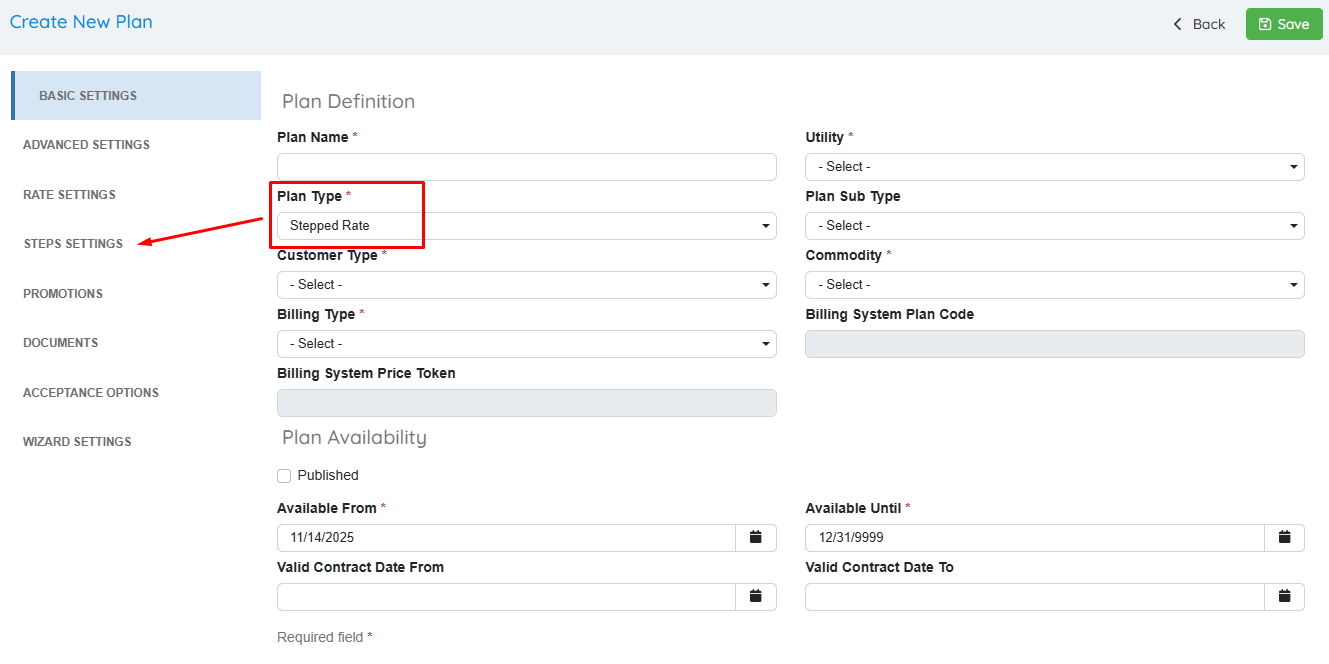
There is a new section in the Plans UI called Step Settings. The purpose of the Stepped Plans is to be presented and managed as a single plan in OpsAdmin but on the billing system there are multiple contracts/service agreements. These steps plans can be composed purely by fixed steps, purely by variable steps, or a mix of both.
- Fixed To Fixed: The customer is promised a fixed rate for the first couple of months, then another fixed rate, and so on.
- Fixed to Variable: The customer is sold a variable product with a fixed length and the promise to maintain the price for the first couple of months only.
- Variable to Variable: The customer is sold a variable never ending product with the promise to maintain the price for the first couple of months only.
These plans will have the option to set up between 2 and 5 steps. Utilities that work with the ECI Billing System have a max of two steps.
For each of the steps, users can define the Billing System Plan Code, term, rate, monthly fee and the step type (Fixed or Variable). Therefore, all this data can no longer be edited in the Rate settings area of Plans Manager since it must be configured for each step. Other settings are disabled as well such as the Initial Discount section.
For Utilities that are rate code required, the UI allows selecting the rate code for each of the steps.
Enrollment Presentation for Stepped Rate plans
Accounts enrolled under this plan generate a single enrollment record in OpsAdmin, despite having their plan with multiple Billing System Plan Codes and rates tied to them. This means that even if a plan is composed of three fixed steps of 4 months each, the enrollment will be generated with dates for a 1 year term and every process and validation should run as usual, except for dates synchronization which will be detailed separately.
When displaying plan data in OpsAdmin for these accounts, the first step plan data is the one displayed.
Integration with the ESG Billing System
Stepped Rate plans only work with the REST API, not SOAP. Depending on how customers are managing their plans in the ESG Billing System, OpsAdmin behaves as follows:
- Service Agreements: A service agreement allows using different rates per contract using the same plan code or different ones. For each stepped plan, OpsAdmin stacks a service contract in the account. These service agreements need to be created **after **the enrollment has been accepted.
- Pricing Plans: It's how our variable plans are created in ESG. In this case, each new variable plan or step has its own billing plan code and the price is tied to that pricing plan. As these are already created in ESG, nothing is needed from OpsAdmin.
When submitting an enrollment to ESG, the first step plan data is sent via API. Once the enrollment is Accepted by the Utility and it starts flowing, the remaining steps are submitted to the billing system using a specific REST endpoint. If there’s any kind of issue at the time of submitting the service agreements, OpsAdmin has a backend job that will retry the process.
Integration with the ECI Billing System
With ECI, all the data is submitted with the first step. It is limited to receive two steps plus the default plan.
Sync Enrollment Dates
Stepped Rate Plans will be ignored by this task, therefore, there will be no syncing of contract dates from the Billing Systems to OpsAdmin.
ESG’s contract ID field
In regards to the contract ID field from ESG, currently being used to tie to Enrollment ID, as multiple service agreements will reflect the same contract ID, the field can no longer be used for linking ESG data with OpsAdmin data.
Dynamic Fields
To display data on documents, OpsAdmin incorporates a new set of partial variables named step_billing_name, step_term, step_rate_cents, **step_rate_dollars **and step_monthly_fee. These are *partial *because they work only if they are followed by the sequence order, for example step_billing_name_1 or step_rate_4. The existing variables like term, rate_cents, monthly_fee, etc. that are used in the other type of plans should simply be replaced with whatever data is stored in the first step. Traunches are always calculated using the first step values.
Renewal Notices for Stepped Rate Plans
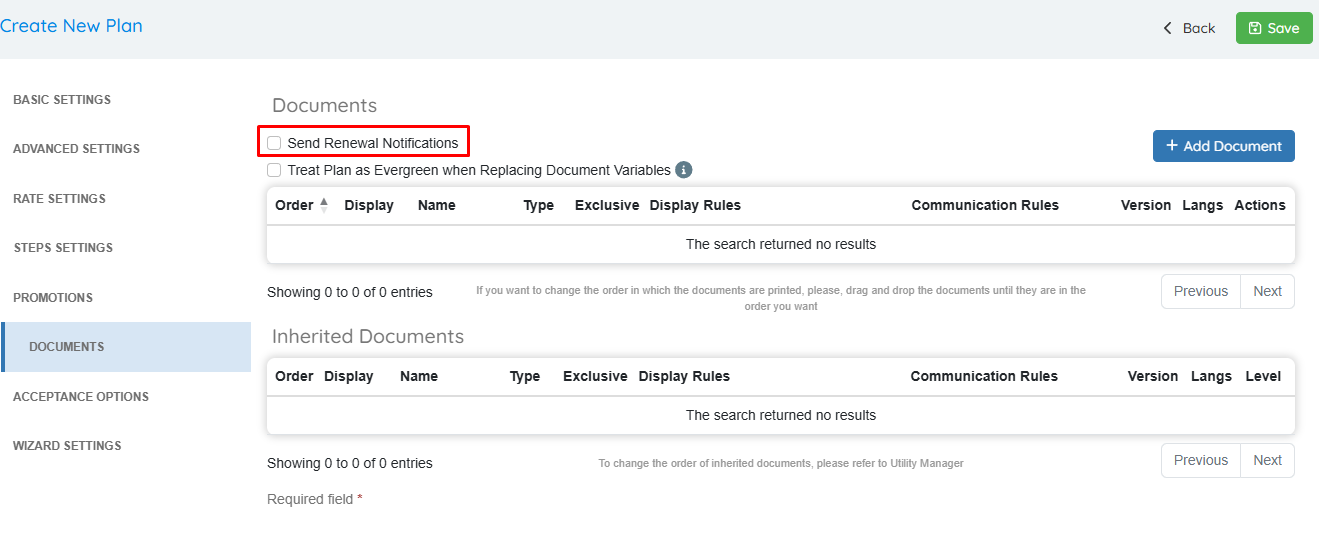
There is a new checkbox “Send Renewal Notifications” only available for Stepped Rate plans or Variable Plans. By checking this, OpsAdmin will include enrollments associated with this plan when sending renewal notices.
By default is set to False, as the logic for variable plans is to never end, therefore there is no need for a renewal notification. This change helps reduce the usage of some workarounds like setting up variable plans with a 1 month length even though in reality they are longer, just so that OpsAdmin doesn't pick the enrollment for the renewal notices due to the date differences.
Adjustment for Evergreen Plans
An evergreen plan is a variable plan with no end date (usually the default plans). These plans, as they don't have end dates, they need to communicate information in documents and autoresponders in a different way. Because OpsAdmin forces users to set up a term and have an end date, this is solved by adding a new checkbox, below the one for renewals described above with the name Treat Variable Plan As Evergreen When Replacing Document Variables. This checkbox is disabled by default.
When this option is enabled the following replacement variables have a hardcoded value:
- Plan Type: Variable
- Term: Month-To-Month
- Contract End Date: Empty Text
Stepped Rate Plans Limitations
To ensure this functionality works as expected, there are some specific limitations that must be considered:
- It is not possible to export created / edited plans to the billing systems.
- It is not possible to create / update these plans during the sales import process and similar.
- It is not possible to create / update these plans using Global Price Changes.
- It is not possible to use these plans in combination with the initial discount functionality. It will be possible to use it with Time of use in a nearby future but that will be addressed on its own development.
- The values presented in documents and autoresponders must be hardcoded by users depending on the step variable used. There is not a process that automatically shows data based on the current step.
Examples
To have a better understanding of the functionality, the following examples can be used as a guide.
- Fix To Fix plan:
- Configure 3 fixed steps:
- First step, 3 months at 10 cents; name FIX1
- Second step, 3 months at 11 cents: same name.
- Third step, 6 months at 12 cents: same name.
- Default plan: DEF1
- In Ops, it's stored as a 12 months plan with dates from Jan 1st to Dec 31st.
- For ESG:
- The prospect to ESG is sent with a 3 months length at 10 cents, the name FIX1, and NO default plan.
- On the Accepted process, OpsAdmin creates two extra Loaded Contracts using the API for 3 and 6 months. In the last contract send DEF1 as default plan.
- For ECI: It's only possible to set two steps, so let's say the plan above is for only 6 months.
- The prospect to ECI is sent with 3 months at 10 cents and the name FIX1 in the RX1, 3 months at 11 cents and the name FIX1 in the RX2, and the default plan data in RX3.
- Configure 3 fixed steps:
- Fix To Var plan:
- Configure 2 fixed steps, 2 variable steps:
- First step, 3 months at 10 cents; name FIX1
- Second step, 3 months at 11 cents: same name.
- Third step, 2 months at 12 cents; name VAR1
- Fourth step, 2 months at 12 cents; name VAR2
- Default plan DEF1
- In Ops, it's stored as a 10 months plan with dates from Jan 1st to Oct 31st.
- For ESG:
- The prospect to ESG is sent with a 3 months length at 10 cents, the name FIX1, and NO default plan.
- On the Accepted process, OpsAdmin creates one extra Service Contracts using the API for 3 months and here send VAR1 as the default plan
- The user must have the pricing plans correctly set up in ESG to jump from VAR1 to VAR2 to DEF1
- For ECI: It's only possible to set two steps, so let's keep only the first fixed and variable plans.
- The prospect to ECI is sent with 3 months at 10 cents and the name FIX1 in the RX1, 2 months at 12 cents and the name VAR1 in the RX2, and the default plan data in RX3.
- Configure 2 fixed steps, 2 variable steps:
- Var To Var plan:
- Configure 3 variable steps:
- First step, 1 month at 10 cents; name VAR1.
- Second step, 2 months at 11 cents; name VAR2.
- Third step, 9 months at 12 cents; name VAR3.
- In Ops, it's stored as a 12 months plan with dates from Jan 1st to Dec 31st.
- For ESG:
- The prospect to ESG is sent with a 1 month length at 10 cents, the name VAR1, and as default plan VAR2.
- The user must have the pricing plans correctly set up in ESG to jump from VAR2 to VAR3 to DEF1
- For ECI: It's only possible to set two steps, so let's keep only the first two steps.
- The prospect to ECI is sent with 1 month at 10 cents and the name VAR1 in the RX1, 2 months at 11 cents and the name VAR2 in the RX2, and the default plan data in RX3.
- Configure 3 variable steps:
In the two scenarios where at least one fixed step exists the system sends the renewal notices. For the case where every step is variable by default the system doesn’t send the renewal notice but it is possible to force sending the renewal if the corresponding check is set up in the documents section of the plan set up.